Seedance 2.0 AI Video Storyboard Prompt Guide: Templates, Timeline Formula, and Multimodal Reference Syntax
Practical Seedance 2.0 prompt guide with storyboard formulas, camera moves, scene templates, sound tips, and copy-ready AI video examples.
Seedance 2.0 AI Video Storyboard Prompt Guide
Seedance 2.0 is most useful when your prompt reads like a short production brief, not just a single sentence. A strong AI video prompt should define the style, duration, aspect ratio, timeline, camera movement, action, sound design, and reference assets.
This guide converts the original workflow into a clean English system for Google SEO, creator tutorials, and direct copy-and-paste use. All prompt templates below are written in English only.

Quick Summary
Use this structure whenever you write a Seedance 2.0 prompt:
Quick Summary
Style: [visual style], [duration], [aspect ratio], [mood] Timeline: 0-X seconds: [camera movement] + [visual scene] + [character or product action] + [effects] X-Y seconds: [camera movement] + [visual scene] + [character or product action] + [effects] Sound: [music style] + [sound effects] + [dialogue or voiceover] References: @Image 1 as the first frame, @Video 1 for camera movement, @Audio 1 for music or dialogue
1. Core Capabilities and Practical Limits
Seedance-style video prompting works best when you use multimodal references deliberately. Each asset should have a clear role: first frame, last frame, character reference, scene reference, motion reference, action reference, music, sound effect, or dialogue.
| Input type | Suggested limit | Best use |
|---|---:|---|
| Images | Up to 9 | First frame, last frame, character reference, product reference, scene reference |
| Videos | Up to 3 | Camera movement, action rhythm, effects reference |
| Audio | Up to 3 | Background music, sound effects, dialogue or voiceover reference |
| Text | No fixed creative limit | Natural language direction, timeline, camera movement, story beats |
Important practical limits:
- Avoid using realistic real-person face source material if the tool or project workflow does not support it.
- Keep the total number of uploaded files within 12 assets.
- Keep video and audio reference duration short and focused, ideally within 15 seconds total.
- Video references usually cost more credits than still-image references.
- Every reference should be explicitly named in the prompt, such as
@Image 1 as the first frameor@Video 1 for camera movement.
2. Standard AI Video Storyboard Prompt Formula
The best formula is simple: define the overall creative direction first, then break the video into timestamped beats.
Standard AI Video Storyboard Prompt Formula
Style: [Visual style], [duration], [aspect ratio], [mood] Timeline: 0-X seconds: [shot type or camera movement], [scene setup], [main action], [visual effect] X-Y seconds: [shot type or camera movement], [story development], [main action], [visual effect] Y-Z seconds: [shot type or camera movement], [climax or transition], [main action], [visual effect] Sound: [background music] + [sound effects] + [dialogue or voiceover] References: @Image 1 for [purpose], @Video 1 for [purpose], @Audio 1 for [purpose]
3. Why Timeline Prompts Work Better
AI video tools often struggle when a prompt includes too many ideas without order. A timestamped storyboard helps the model understand pacing, continuity, and visual priority.
For example, instead of writing:
For example, instead of writing
A man comes home and hugs his daughter in a warm cinematic family scene.
Use:
Use
Cinematic realistic style, 15 seconds, 2.35:1 widescreen, warm family atmosphere. 0-3 seconds: medium tracking shot, a tired man walks down an apartment hallway and stops at his front door. 3-5 seconds: close-up, he takes a deep breath and softens his expression. 5-7 seconds: hand close-up, he takes out his key and opens the door. 7-12 seconds: indoor medium shot, his daughter and pet dog run toward him, and he kneels to hug them. 12-15 seconds: close-up, the man smiles with relief under warm indoor light. Sound: gentle piano music + footsteps + door opening + laughter. References: @Image 1 as the man reference, @Image 2 as the daughter reference, @Image 3 as the pet dog reference.
4. 16 Seedance 2.0 AI Video Prompt Templates
Below are 16 English storyboard templates you can reuse for different video types.

Template 1: Narrative Story Video
Use this for emotional stories, short films, cinematic scenes, fantasy narratives, and dramatic social media shorts.
Narrative Story Video
Style: cinematic realistic / animated / ink-wash / sci-fi style, 15 seconds, 16:9 or 2.35:1 widescreen, [mood]. 0-3 seconds: [camera movement], establish the location, introduce the main subject. 3-7 seconds: [camera movement], develop the story, show the key action. 7-11 seconds: [camera movement], reveal the conflict or emotional climax. 11-13 seconds: [camera movement], create a transition or reversal. 13-15 seconds: [camera movement], final frame, emotional resolution or title-safe ending. Sound: [music style] + [sound effects] + [dialogue]. References: @Image 1 as the first frame, @Video 1 for camera movement.
Template 2: Product Showcase Video
Use this for ecommerce, brand videos, app launches, tech products, cosmetics, fashion items, and premium product ads.
Product Showcase Video
Style: commercial advertising style, minimal, premium, high-tech, 10-15 seconds. 0-2 seconds: eye-catching opening, macro product close-up or mystery reveal. 2-5 seconds: full product reveal, orbit camera movement or smooth dolly shot. 5-8 seconds: detail close-ups, show materials, texture, finish, craftsmanship, and key features. 8-12 seconds: real-use scenario, show the product solving a clear user need. 12-15 seconds: brand ending frame, clean slogan-safe composition. Sound: cinematic / upbeat fashion / futuristic music. References: @Image 1 for product appearance, @Image 2 for material reference.
Template 3: Character Action Video
Use this for martial arts, dance, stunts, sci-fi heroes, fantasy characters, game characters, and stylized action scenes.
Character Action Video
Style: [martial arts / sci-fi / modern / fantasy] character action style, 15 seconds. 0-3 seconds: character entrance, hold the pose or slowly reveal the full costume. 3-6 seconds: action preparation, show the starting stance and body tension. 6-11 seconds: core action sequence, fighting / dancing / stunt movement with clear motion rhythm. 11-13 seconds: action ending, freeze into a strong final pose. 13-15 seconds: enhance the atmosphere with visual effects, dust, sparks, light, or energy trails. Sound: action sound effects + atmospheric music. References: @Image 1 as the character design, @Video 1 as the action reference.
Template 4: Travel and Landscape Video
Use this for scenic travel, healing lifestyle content, nature documentaries, city exploration, and epic environment shots.
Travel and Landscape Video
Style: cinematic documentary / healing travel / epic landscape style, 15 seconds. 0-3 seconds: wide establishing shot, show the full environment. 3-6 seconds: medium push-in, introduce a person, vehicle, animal, or environmental detail. 6-10 seconds: multi-angle sequence, reveal different sides of the landscape. 10-13 seconds: close-up detail, show light, wind, water, texture, plants, or architecture. 13-15 seconds: return to a wide shot or poetic final frame. Sound: natural ambience + atmospheric music. References: @Image 1-5 as scene references.
Template 5: Video Extension or Continuation
Use this when you want to extend an existing video while preserving its subject, style, motion, and scene logic.
Video Extension or Continuation
Extend @Video 1 by [X] seconds. Continue the same visual style, subject identity, lighting, camera movement, and scene atmosphere from the original video. 0-X seconds: [new content description], seamlessly connected to the ending of @Video 1. Requirements: maintain character consistency, smooth motion continuity, matching lighting, matching camera movement, and no sudden scene jump.
Template 6: Video Editing or Story Rewrite
Use this when you want to keep part of the original video but change a specific plot point, object, action, or ending.
Video Editing or Story Rewrite
Edit @Video 1 based on the following instructions. Keep: the original camera movement, main scene, and selected character actions. Modify: [specific change 1]. Modify: [specific change 2]. Reverse: [describe the story twist or new ending]. Requirements: keep the shot continuity natural, change only the specified parts, and preserve the original visual style.
Template 7: Emotional Conflict Video
Use this for relationship drama, family conflict, short emotional stories, betrayal reveals, reconciliation scenes, and vertical drama clips.
Emotional Conflict Video
Style: fast-cut emotional drama / intense emotional climax / beautiful melancholic style, 15 seconds, 9:16 or 16:9. Characters: [Character 1 description] versus [Character 2 description]. 0-3 seconds: conflict opening, show the two characters interacting under tension. 3-7 seconds: reveal the truth, show a key object, message, document, or memory trigger. 7-12 seconds: emotional explosion, show reactions, hesitation, anger, tears, silence, or collapse. 12-15 seconds: freeze-frame or final shot, hold the emotional aftertaste. Sound: ambient sound + emotional music + climax music hit. References: @Image 1 as Character 1, @Image 2 as Character 2.
Template 8: Product Motion Graphics Video
Use this for app UI, software products, dashboards, SaaS features, digital products, and interface walkthroughs.
Product Motion Graphics Video
Style: acrylic glass texture / fast-flash motion graphics / futuristic technology style, 15 seconds. Generate a product motion video based on @Image 1. Use smooth motion design and multiple camera angles to showcase UI details. Product description: [Product name] is a [product type] that provides [feature 1], [feature 2], and [feature 3]. Requirements: clean interface movement, readable layout, elegant transitions, premium product presentation. References: @Image 1-N as UI screen references.
Template 9: Architectural or Interior Walkthrough
Use this for real estate, architecture visualization, interior design, exhibition halls, retail spaces, and spatial storytelling.
Architectural or Interior Walkthrough
Style: immersive spatial walkthrough / architectural visualization, 15 seconds. Generate an immersive space tour based on @Image 1 as the floor plan and @Image 2 as the storyboard reference. Storyboard order: [Space 1] -> [Space 2] -> [Space 3] -> [Space 4] -> [Space 5]. Requirements: smooth camera movement, realistic lighting, consistent spatial layout, clear sense of direction, premium architectural presentation. References: @Image 1 as the floor plan, @Image 2 as the storyboard reference.
Template 10: Character Battle Video
Use this for stylized battles, game trailers, fantasy duels, sci-fi fights, and action concept videos.
Character Battle Video
Style: realistic / animated / cinematic action style, 5-15 seconds. Figure 1 and Figure 2 fight in [scene]. 0-3 seconds: establish both figures and the battle environment. 3-8 seconds: show the first exchange of attacks with clear motion direction. 8-12 seconds: intensify the battle with impact, sparks, dust, energy, or environmental damage. 12-15 seconds: finish with a dramatic pose, clash, or cliffhanger. Important: use "Figure 1" and "Figure 2" instead of copyrighted character names. References: @Image 1 as Figure 1, @Image 2 as Figure 2, @Video 1 as the action reference.
Template 11: Talking Head or Lip-Sync Video
Use this for podcast clips, educational explainers, virtual hosts, product explainers, and short-form talking videos.
Talking Head or Lip-Sync Video
Style: professional podcast / natural conversational style, 15 seconds or longer if supported. Use the person in @Image 1 and the voice in @Audio 1 to generate a talking-head video with natural lip sync and subtitles. Requirements: stable face framing, natural mouth movement, realistic eye contact, clean subtitle-safe composition, consistent lighting. References: @Image 1 as the speaker appearance, @Audio 1 as the voiceover content.
Template 12: Beat-Synced Music Edit
Use this for music videos, photo montage, travel recaps, event highlights, and fast social media edits.
Beat-Synced Music Edit
Style: beat-synced edit / dynamic transition effects. Cut images @Image N through @Image 1 into the beat points of @Audio 1 in sequence. Requirements: synchronize image transitions with the rhythm of the music, use clean beat-matched cuts, preserve image clarity, and avoid random pacing. References: @Image 1-N as the photo sequence, @Audio 1 as the background music.
Template 13: Viral Short Hook Video
The original template list jumps from 12 to 14. For a complete 16-template system, this extra template is useful for short-form platforms and ad-style hooks.
Viral Short Hook Video
Style: high-retention social media short, fast opening hook, 9:16 vertical video, 10-15 seconds. 0-2 seconds: strong visual hook, show the most surprising moment first. 2-5 seconds: reveal the situation, introduce the subject and the main visual contrast. 5-10 seconds: escalate the action or show the transformation process. 10-13 seconds: deliver the payoff, before-and-after reveal, or emotional turn. 13-15 seconds: final frame with a clean call-to-action-safe composition. Sound: punchy music hit + quick sound effects + optional voiceover. References: @Image 1 as the main subject, @Video 1 as pacing reference, @Audio 1 as music reference.
Template 14: War or Battlefield Scene
Use this only for fictional, historical, cinematic, or game-like scenes. Keep the focus on visual storytelling, atmosphere, and cinematic staging.
War or Battlefield Scene
Style: cinematic realistic style, handheld camera texture, 15 seconds, 2.35:1 widescreen. 0-4 seconds: the main subject enters the scene, low-angle forward camera movement. 4-8 seconds: conflict erupts, show distant flashes, smoke, debris, and chaotic movement. 8-12 seconds: the camera pushes forward, lighting changes through smoke and dust. 12-15 seconds: the subject reaches a higher position, wide overhead view of the scene. Requirements: cinematic atmosphere, controlled fictional staging, no graphic injury detail. References: @Image 1-2 as scene references.
Template 15: Long-Take Tracking Shot
Use this for high-speed chases, drone-follow shots, flying objects, action sports, racing, and one-shot cinematic movement.
Long-Take Tracking Shot
Style: cinematic realistic style, dynamic motion blur, high-speed tracking, 15 seconds, 2.35:1. 0-2 seconds: establish the scene, show the subject preparing to move. 2-5 seconds: the action begins, camera shake and acceleration start. 5-12 seconds: the camera accelerates and closely follows the flying or moving subject. 12-15 seconds: the subject reaches the target, final impact or freeze-frame moment. Requirements: continuous long-take feeling, strong motion direction, realistic speed, consistent subject tracking. References: @Image 1 as the subject, @Image 2 as the scene.
Template 16: Mockumentary or Vlog-Style Twist
Use this for fake documentary scenes, realistic vlog setups, found-footage stories, comedic twists, and everyday scenes with a strange ending.
Mockumentary or Vlog-Style Twist
Style: mockumentary / vlog style, fixed camera realism, 15 seconds, 9:16 vertical video. 0-6 seconds: daily setup, show [scene] and [normal action]. 6-11 seconds: anomaly appears, the action changes and something unusual happens. 11-15 seconds: final twist, show the main subject reacting, then freeze the frame. Requirements: natural handheld or fixed-camera realism, believable everyday lighting, subtle buildup, clear final twist. References: @Image 1 as the main subject appearance.

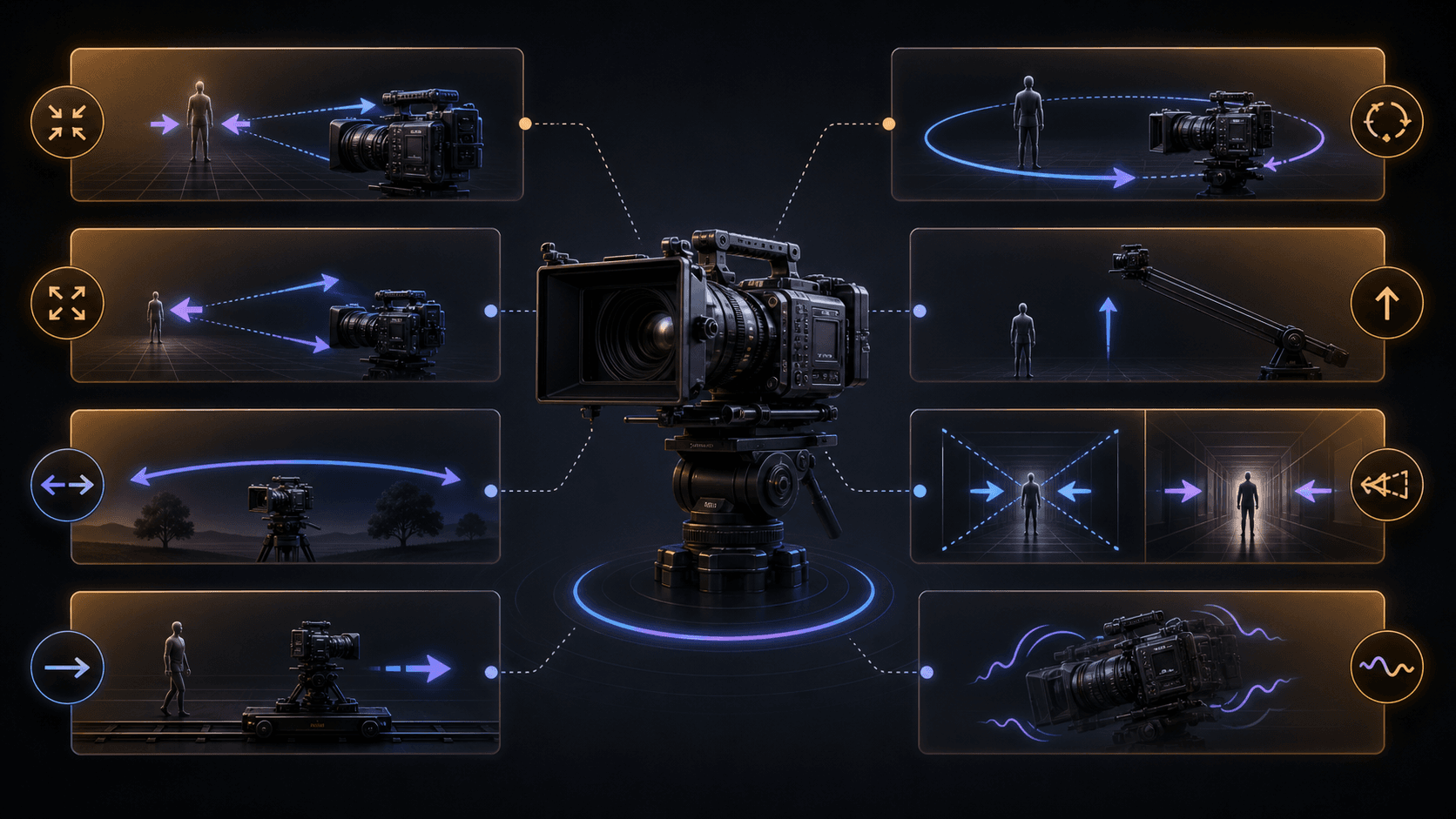
5. Camera Language Quick Reference
Use these camera movement terms inside any template.
| Effect | Prompt wording | Best use |
|---|---|---|
| Push in | `slow dolly in`, `camera moves closer` | Emphasize the subject and create tension |
| Pull back | `slow dolly out`, `camera moves backward` | Reveal the environment or create emotional distance |
| Pan | `pan left`, `pan right`, `slow horizontal pan` | Reveal a wide environment or guide attention |
| Track | `tracking shot`, `follow camera`, `camera follows the subject` | Follow movement and increase immersion |
| Orbit | `orbit shot`, `360-degree camera rotation` | Showcase a subject, product, vehicle, or hero moment |
| Rise or descend | `crane up`, `crane down`, `drone descent` | Shift from detail to overview or overview to detail |
| Vertigo effect | `dolly zoom`, `Hitchcock zoom`, `background stretches` | Show shock, fear, realization, or psychological pressure |
| Handheld | `handheld camera`, `slight camera shake` | Add documentary realism, urgency, or tension |
6. Atmosphere Keyword Bank
Add these keywords when you need more precise mood and visual direction.
| Category | Keywords |
|---|---|
| Lighting | backlight, side light, overhead light, Rembrandt lighting, silhouette, rim light, volumetric light, Tyndall effect |
| Color | warm tone, cool tone, high saturation, low saturation, black and white, cyberpunk neon, vintage film color |
| Texture | cinematic, documentary style, commercial polish, music video style, oil-painting texture, ink-wash texture |
| Emotion | warm, tense, suspenseful, joyful, melancholic, epic, healing, thriller-like |
7. Multimodal Reference Syntax
Use reference syntax clearly so each file has only one main job.
Multimodal Reference Syntax
@Image 1 as the first frame. @Image 2 as the last frame. @Image 3 as the character appearance reference. @Image 4-6 as scene references. @Video 1 as the camera movement reference. @Video 2 as the action rhythm reference. @Audio 1 as the background music. @Audio 2 as the dialogue reference.
8. Special Scenario Handling
| Scenario | Recommended handling |
|---|---|
| Character consistency | Provide a character reference image and describe clothing, silhouette, colors, and accessories consistently. Avoid unsupported realistic face-source workflows. |
| Camera movement replication | Provide a short video reference and write `closely follow the camera movement of @Video 1`. |
| Video extension | Write `extend @Video 1 by X seconds` and choose the generated duration accordingly. |
| Story reversal | Separate the instruction into `Keep`, `Modify`, and `Reverse` sections. |
| Beat-synced music edit | Provide a music reference and align each visual change to the timeline or beat structure. |
9. Six Traits of a High-Quality AI Video Prompt
| Trait | Why it matters |
|---|---|
| Clear timeline | Timestamped beats help the model understand pacing and order. |
| Specific camera language | Camera verbs such as dolly, pan, orbit, and tracking make the shot easier to generate. |
| Concrete action | Clear physical actions work better than vague mood words. |
| Correct reference syntax | Each uploaded asset needs a clear purpose. |
| Complete sound design | Music, sound effects, and dialogue improve the production brief. |
| Clear asset labels | The model should know exactly how to use every image, video, and audio file. |
10. Three-Step Quick Start
- Choose a template based on your video type.
- Fill in the style, duration, aspect ratio, timeline, camera movement, action, and sound.
- Upload reference assets and label each one with
@Image,@Video, or@Audiosyntax.
11. Copy-Ready Example: Emotional Family Story
Copy-Ready Example: Emotional Family Story
Cinematic realistic style, 15 seconds, 2.35:1 widescreen, warm family atmosphere. 0-3 seconds: medium tracking shot, a tired man walks down an apartment hallway and stops at his front door. 3-5 seconds: facial close-up, the man takes a deep breath, adjusts his emotion, and his expression becomes softer. 5-7 seconds: hand close-up, he takes out his key and opens the door. 7-12 seconds: indoor medium shot, his daughter and pet dog run toward him, and the man kneels down to hug them. 12-15 seconds: close-up, the man smiles with happiness under warm indoor light. Sound: gentle piano music + environmental sound effects, including footsteps, door opening, and laughter. References: @Image 1 as the man reference, @Image 2 as the daughter reference, @Image 3 as the pet dog reference.
12. SEO-Friendly Title Ideas
Use one of these titles if you publish this as a blog post, Notion guide, Gumroad product page, or prompt-pack article:
- Seedance 2.0 AI Video Storyboard Prompt Guide
- 16 Seedance 2.0 Prompt Templates for AI Video Generation
- How to Write Timeline-Based AI Video Prompts
- Multimodal AI Video Prompt Formula for Seedance 2.0
- Best Seedance 2.0 Prompt Templates for Story, Product, Travel, and Vlog Videos
13. FAQ
What is the best prompt structure for Seedance 2.0?
The best structure is: style, duration, aspect ratio, timeline, sound design, and references. A timestamped timeline is especially important because it tells the model what should happen at each moment.
How do I keep characters consistent in AI video?
Use a reference image and repeat the character's stable visual traits in the prompt: outfit, color palette, hairstyle, silhouette, accessories, and role. If the workflow does not support realistic real-person face references, use stylized or non-realistic character references instead.
Should I use video references?
Use video references only when camera movement, action rhythm, or effects are hard to describe with text. Keep them short and focused because they may consume more credits.
What makes a Seedance prompt look cinematic?
Use precise camera language, realistic lighting, clear scene staging, controlled pacing, and sound design. Phrases such as slow dolly in, handheld camera, volumetric light, cinematic color grading, and wide establishing shot help create a more film-like result.
Can I use these templates for other AI video tools?
Yes. The structure also works for many AI video tools, including Sora-style, Runway-style, Kling-style, Pika-style, and Luma-style workflows. You may need to adjust asset syntax depending on the platform.