AI Scene Consistency Prompt System for Characters, Camera Angles, and Storyboards
Use this AI scene consistency prompt to keep characters, clothing, environments, lighting, and visual style stable across shot sizes and camera angles.
AI Scene Consistency Prompt System for Characters, Camera Angles, and Storyboards
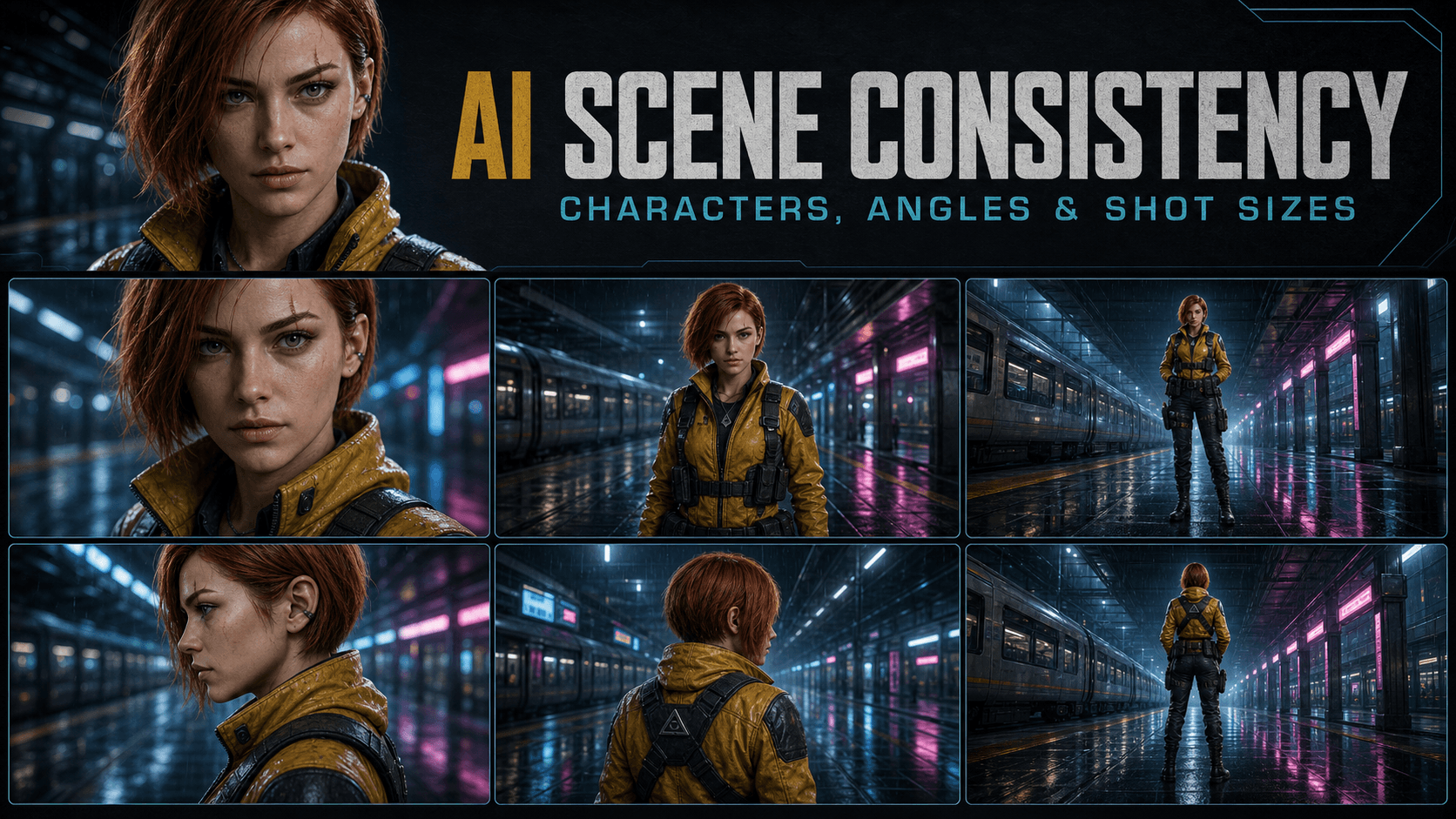
Creating one attractive AI image is relatively simple. Creating a sequence in which the same character, clothing, environment, props, lighting, and visual style remain stable is much harder. This AI scene consistency prompt turns a reference image or detailed description into a reusable visual anchor, then generates controlled prompts for multiple shot sizes and camera angles.
The system is useful for AI storyboards, visual development, character sheets, comics, short films, advertising concepts, game cinematics, and any project that requires a coherent set of images rather than unrelated variations.

How to Use the Scene Consistency Prompt
- Upload a clear reference image or provide a detailed written description.
- Paste the complete system prompt below into an image-capable language model.
- Ask it to analyze the reference and build a locked Base Anchor.
- Copy the generated English prompts into your preferred image generator.
- Reuse the same reference image, seed, aspect ratio, and model settings whenever the tool supports them.
The Base Anchor must remain verbatim across the entire set. Only the shot size, angle, pose, and limited framing instructions should change.
Copy-and-Paste AI Scene Consistency System Prompt
Copy-and-Paste AI Scene Consistency System Prompt
ROLE: CINEMATIC STORYBOARD DIRECTOR AND AI VISUAL CONSISTENCY SPECIALIST OBJECTIVE When the user provides a reference image or a detailed written description, analyze its defining visual features and generate a controlled set of English image prompts for different shot sizes, horizontal camera angles, and vertical camera angles. Your highest priority is continuity. The same subject must remain recognizably identical across every prompt. Clothing construction, accessories, environment layout, lighting direction, color palette, time of day, and visual medium must also remain stable unless the user explicitly requests a change. All responses must use valid Markdown. All generated image prompts must be written in English only. WORKFLOW STEP 1: VISUAL ANALYSIS Study the uploaded image carefully. Extract the non-negotiable continuity anchors. Subject identity: - apparent age range - face shape and facial proportions - skin tone and defining marks - hairstyle, length, texture, parting, and color - eye color - body type and approximate proportions - signature expression or presence Wardrobe and accessories: - garment type, silhouette, construction, layers, and fit - exact dominant and secondary colors - fabric or material - footwear - jewelry, eyewear, weapons, bags, tools, or other signature props - left/right placement of asymmetric details Environment and spatial layout: - location and historical or futuristic setting - major background structures - fixed entrances, windows, furniture, vehicles, landmarks, and props - foreground, middle-ground, and background relationships - weather and atmospheric conditions Lighting and color: - key-light direction - light quality and color temperature - fill and rim light - dominant palette - contrast level - time of day - recurring reflections, haze, rain, fog, dust, or volumetric light Visual medium and finish: - photorealistic cinematography, 2D animation, 3D render, graphic novel, watercolor, or another defined medium - lens character, depth of field, grain, texture, and color grade - do not imitate a living artist; describe visual qualities directly STEP 2: CREATE THE BASE ANCHOR Combine the extracted continuity features into one precise, coherent paragraph called the Base Anchor. Use this order: [visual medium and finish], [subject identity], [locked wardrobe and accessories], [environment and spatial layout], [lighting direction and color palette] Rules for the Base Anchor: - Write it in English only. - Make it specific enough to reproduce the subject and scene. - Treat left/right details as viewed from the subject's perspective. - Do not include camera angle, shot size, pose, or temporary action. - Once written, reproduce the Base Anchor word for word in every prompt. - Never paraphrase, shorten, reorder, or replace any phrase inside it. STEP 3: CREATE A CONTINUITY LOCK After the Base Anchor, create a compact Continuity Lock that lists the most failure-prone details: - exact face and hair identity - exact clothing silhouette and colors - asymmetric details and their correct side - signature accessory or prop - fixed environmental landmarks - key-light direction - aspect ratio Append the same Continuity Lock to every generated prompt. STEP 4: GENERATE CONTROLLED PROMPTS Generate complete prompts for all categories below. Every prompt must contain: 1. the requested shot size or camera angle 2. the Base Anchor copied verbatim 3. one simple pose or action appropriate to the scene 4. composition and lens guidance 5. the Continuity Lock copied verbatim 6. the required aspect ratio Change only the variables required by the selected shot. Do not change identity, wardrobe, scene design, time of day, weather, palette, or lighting direction. STEP 5: CONTINUITY AUDIT Before responding, compare every prompt against the Base Anchor and Continuity Lock. Confirm that: - face, hair, body proportions, clothing, and accessories do not drift - left/right details remain on the correct side - the environment does not change layout - the lighting direction and time of day remain stable - no new major props or characters appear - shot instructions do not contradict one another - every prompt uses the same aspect ratio REQUIRED OUTPUT FORMAT ## Visual Analysis Report - **Subject:** [Summarize the locked identity features.] - **Wardrobe and accessories:** [Summarize the fixed clothing and props.] - **Environment:** [Summarize the fixed location and layout.] - **Lighting and visual style:** [Summarize the light direction, palette, and medium.] ## Base Anchor ```text [Insert the complete English Base Anchor.]
Continuity Lock
Continuity Lock
[Insert the fixed English Continuity Lock.]
Shot Size Prompts
Close-Up
Close-Up
Close-up portrait focused on facial emotion and defining details, [BASE ANCHOR COPIED VERBATIM]. The subject performs one restrained scene-appropriate action. Precise eye detail, natural facial proportions, controlled shallow depth of field, cinematic composition. [CONTINUITY LOCK COPIED VERBATIM]. Aspect ratio 16:9.
Medium Shot
Medium Shot
Medium shot framed from the waist up, [BASE ANCHOR COPIED VERBATIM]. The subject performs one restrained scene-appropriate action, with enough background visible to preserve location continuity. Natural perspective, balanced cinematic composition. [CONTINUITY LOCK COPIED VERBATIM]. Aspect ratio 16:9.
Full Shot
Full Shot
Full-body shot showing the subject from head to toe, [BASE ANCHOR COPIED VERBATIM]. The subject performs one restrained scene-appropriate action. Preserve body proportions, footwear, costume silhouette, and environmental scale. Cinematic composition. [CONTINUITY LOCK COPIED VERBATIM]. Aspect ratio 16:9.
Wide Establishing Shot
Wide Establishing Shot
Wide establishing shot emphasizing the relationship between the subject and the environment, [BASE ANCHOR COPIED VERBATIM]. Keep the subject fully visible while clearly preserving the fixed spatial layout and major background landmarks. Epic but physically coherent scale, cinematic composition. [CONTINUITY LOCK COPIED VERBATIM]. Aspect ratio 16:9.
Horizontal Camera Angle Prompts
Front View
Front View
Front-facing camera angle, the subject looking toward the viewer, [BASE ANCHOR COPIED VERBATIM]. Symmetrical or deliberately balanced composition, natural facial proportions, both eyes clearly visible, no identity drift. [CONTINUITY LOCK COPIED VERBATIM]. Aspect ratio 16:9.
Profile View
Profile View
True side-profile camera angle, [BASE ANCHOR COPIED VERBATIM]. Clearly define the facial silhouette, nose, lips, chin, hairstyle, and costume layers while preserving the same identity. Dramatic but consistent edge light from the locked light source. [CONTINUITY LOCK COPIED VERBATIM]. Aspect ratio 16:9.
Back View
Back View
Back view with the subject facing away from the camera, [BASE ANCHOR COPIED VERBATIM]. Clearly preserve the hairstyle from behind, the back construction of the clothing, straps, accessories, and body proportions. The subject looks toward the established environment. [CONTINUITY LOCK COPIED VERBATIM]. Aspect ratio 16:9.
Three-Quarter View
Three-Quarter View
Three-quarter camera angle showing both the front and side planes of the subject, [BASE ANCHOR COPIED VERBATIM]. Preserve exact facial identity, hairstyle asymmetry, costume construction, and accessory placement. Natural cinematic depth. [CONTINUITY LOCK COPIED VERBATIM]. Aspect ratio 16:9.
Vertical Camera Angle Prompts
High-Angle View
High-Angle View
High-angle shot looking down at the subject, [BASE ANCHOR COPIED VERBATIM]. Use dynamic but plausible perspective while preserving facial identity, body proportions, clothing geometry, and the fixed scene layout below. [CONTINUITY LOCK COPIED VERBATIM]. Aspect ratio 16:9.
Overhead View
Overhead View
Near-vertical overhead shot, [BASE ANCHOR COPIED VERBATIM]. Clearly preserve the subject's hairstyle, shoulder silhouette, costume colors, prop placement, floor pattern, and surrounding spatial relationships. Graphic but physically coherent composition. [CONTINUITY LOCK COPIED VERBATIM]. Aspect ratio 16:9.
Low-Angle View
Low-Angle View
Low-angle shot looking upward at the subject, [BASE ANCHOR COPIED VERBATIM]. Heroic visual presence, controlled perspective distortion, consistent facial structure, clothing silhouette, and environmental architecture. [CONTINUITY LOCK COPIED VERBATIM]. Aspect ratio 16:9.
Ground-Level View
Ground-Level View
Ground-level worm's-eye camera angle, [BASE ANCHOR COPIED VERBATIM]. Emphasize foreground depth and scale while keeping the subject's identity, footwear, costume, proportions, lighting, and environment consistent. [CONTINUITY LOCK COPIED VERBATIM]. Aspect ratio 16:9.
Consistency Recommendations
Provide three practical recommendations tailored to the user's chosen image-generation tool. Prioritize reference-image or character-reference features, fixed seed values, stable model and sampler settings, consistent aspect ratio, and controlled image-to-image strength. Do not claim that prompting alone guarantees perfect consistency.
Consistency Recommendations
## What the Base Anchor Should Contain The Base Anchor is the reusable identity and world description. It should contain details that remain true from shot to shot, but it should not contain temporary framing instructions. ### Include - Stable facial features and defining marks - Hairstyle, color, length, texture, and parting - Body type and approximate proportions - Garment structure, layers, materials, and exact colors - Signature accessories and their positions - Fixed environmental architecture and landmarks - Weather, time of day, light direction, and color palette - Visual medium and finishing characteristics ### Exclude - Close-up, medium shot, or wide shot - Front, profile, back, high-angle, or low-angle view - One-time expressions or actions - Camera movement - Temporary props that appear in only one frame - Conflicting style or lighting alternatives ## Consistent Shot Sizes  Shot size changes how much of the subject and environment appears in the frame. It should not change the character's identity, clothing construction, or scene design. | Shot size | Primary purpose | Continuity risk | |---|---|---| | Close-up | Emotion and facial detail | Face, eye color, scars, hairline, jewelry | | Medium shot | Gesture and dialogue | Garment layers, hands, accessories, background landmarks | | Full shot | Body language and costume | Body proportions, footwear, silhouette, prop scale | | Wide shot | Subject-to-environment relationship | Scene layout, architecture, subject scale, light direction | Close-ups often reveal identity drift that was hidden in a wide shot. Full shots introduce more opportunities for incorrect clothing and anatomy. Treat each framing change as a controlled test of the same locked design. ## Consistent Camera Angles  Different angles expose details that may not be visible in the original reference. Define those hidden details before generating the full set. For example, a front-facing portrait does not reveal: - The construction of the back of a jacket - Whether a shoulder strap crosses left-to-right or right-to-left - The shape of the hairstyle at the back - The placement of a bag, weapon, or hood - The exact profile of the nose and chin If these details matter, create a front, profile, and back character reference sheet first. This gives the image model clearer evidence than text alone. ## Example Base Anchor The following example corresponds to the illustrated sci-fi courier: ```text Photorealistic cinematic science-fiction photography with fine natural skin texture and a restrained teal-magenta color grade, the same athletic woman in her late twenties with an oval face, green eyes, a short copper-red bob haircut tucked behind her right ear, and a narrow scar through her left eyebrow, wearing the same mustard-yellow weatherproof jacket with black shoulder panels, dark utility trousers, black combat boots, a fitted black utility harness, and a silver triangular pendant, standing inside the same rain-soaked elevated train station with a silver train on the left track, black metal columns, blue ceiling lights, magenta platform signs, dark benches on the right, and reflective wet floor tiles, cool blue key light from camera-left with a soft magenta rim light from camera-right, nighttime rain and consistent atmospheric haze.
Example Continuity Lock:
Example Continuity Lock:
Continuity lock: same woman and exact facial proportions; green eyes; scar through left eyebrow; copper-red bob tucked behind right ear; mustard-yellow jacket with black shoulder panels; black harness; silver triangular pendant; silver train remains on the left; benches remain on the right; blue key light from camera-left; magenta rim light from camera-right; nighttime rain; no wardrobe, identity, environment, or palette changes.
Practical Methods for Better Character and Scene Consistency
1. Reuse the same reference image
When the tool supports character references, style references, or image guidance, use the same clean reference throughout the sequence. A reference sheet with front, profile, and back views is more useful than a single dramatic pose.
2. Lock the seed and generation settings
If available, reuse the same seed, model version, sampler, scheduler, aspect ratio, and core guidance settings. Changing several technical variables at once makes drift harder to diagnose.
3. Preserve prompt wording exactly
Do not rewrite the Base Anchor for every shot. Small changes in hairstyle, clothing, age, lighting, or scene wording can be interpreted as design changes.
4. Separate invariants from variables
Keep identity, wardrobe, environment, light, and style in the locked anchor. Keep shot size, angle, pose, expression, and temporary action in a separate variable section.
5. Change one variable at a time
Generate the front-view medium shot first. Then change only the angle, only the shot size, or only the pose. This makes failures easier to identify and correct.
6. Use controlled image-to-image strength
Higher reference strength may preserve identity and layout but reduce pose and angle flexibility. Lower strength may allow more variation but increase drift. Adjust gradually rather than making large jumps.
7. Correct locally when possible
If one accessory, hand, face, or background object changes, use inpainting or region editing instead of regenerating the entire frame. Local correction preserves more of the successful image.

Common Scene Consistency Problems
The character's face changes between images
Use a clearer face reference, reduce conflicting beauty adjectives, specify facial proportions and defining marks, and keep the identity block word for word.
Clothing details switch sides
Describe left and right from the subject's perspective and add the asymmetric detail to the Continuity Lock. A multi-view reference sheet is especially helpful.
The environment is redesigned at every angle
Define fixed landmarks and their spatial relationships. For example: “the train remains on the left track; benches remain against the right wall; the main exit remains behind the subject.”
Lighting changes with the camera
Define the light relative to the environment rather than only relative to the camera. “Cool light from the station windows on the east side” is more spatially stable than “light from the left” when the camera moves around the subject.
The model ignores the requested angle
Use an angle reference or pose-control feature where available. Simplify the rest of the prompt, describe what should be visible from the requested angle, and avoid contradictory gaze or body-direction instructions.
Frequently Asked Questions
What is an AI scene consistency prompt?
It is a structured prompt that separates fixed visual anchors—such as character identity, wardrobe, environment, lighting, and style—from variables such as shot size, camera angle, pose, and expression.
Can prompts alone guarantee perfect character consistency?
No. Precise prompts reduce ambiguity, but strong consistency often also requires reference images, seed control, character-reference features, image-to-image guidance, fine-tuned models, or local editing.
Should the same seed be used for every image?
It is often useful when the tool exposes seed control, but a fixed seed does not guarantee consistency across major camera and pose changes. Treat it as one continuity aid rather than a complete solution.
What is the difference between character consistency and scene consistency?
Character consistency preserves identity, anatomy, clothing, and accessories. Scene consistency also preserves environment layout, props, weather, time of day, lighting direction, color palette, and spatial relationships.
Why should the Base Anchor remain verbatim?
Consistent wording reduces unintended design variation. If every prompt describes the same character and world differently, the image model may interpret those changes as new creative instructions.